
How To Reset Password For cPanel Email

Sometimes you just forget your cPanel email password or for security reasons, you need to reset it! This simple tutorial will show you just how to do that!


STEP 1: Login to your cPanel account and click on Mail Accounts.


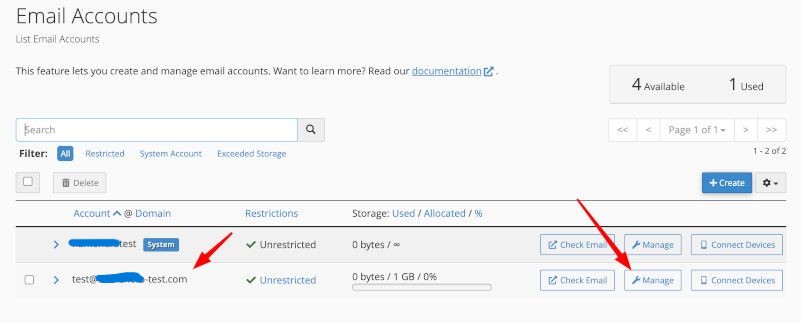
STEP 2: Find the email account you wish to change the password on and click on 'Manage'.
 

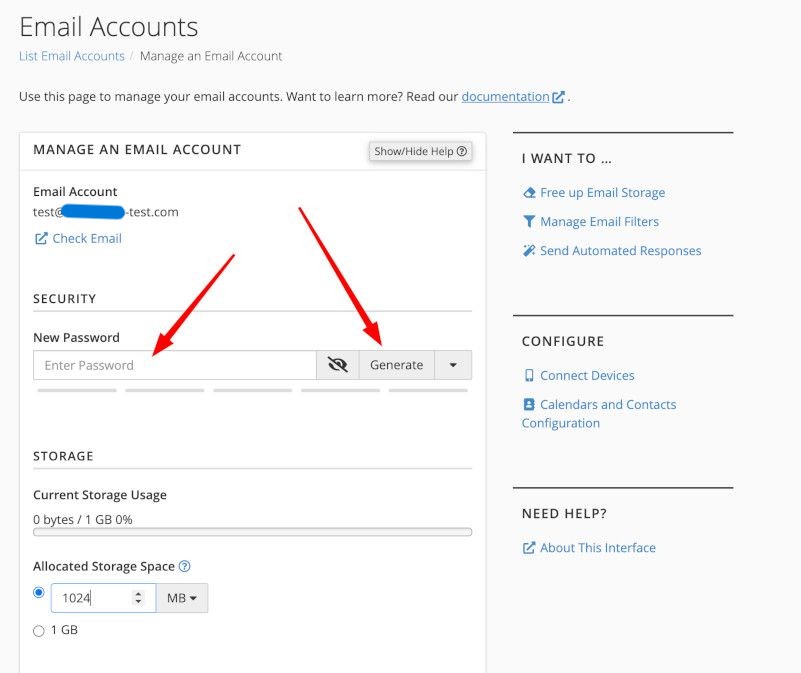
STEP 3: Change the password or use the password generator for strong passwords. It is highly recommended in this day and age to use strong passwords for all your accounts. After you end you pass, scroll down and hit save.

 

  • 0 Utilisateurs l'ont trouvée utile
Cette réponse était-elle pertinente?

Articles connexes

How To Add An Addon Domain In cPanel

Setting Up Addon Domains in cPanel The quick and short answer is:   Log into cPanel on the...

How To Fix The "Your IP Address Has Changed" Error In cPanel

If you've ever tried to log into cPanel and gotten the "Your IP address has changed" error it can...

How To Disable Mod Security

Have you ever tried to make a post in WordPress, Xenforo, or some other content management system...

How To Forward A Domain To Another Domain

One thing we encourage here at alttrixcloud is that you register multiple TLDs for your brand....

How To Setup 301 Redirects In cPanel

The HTTP response status code 301 Moved Permanently is used for permanent URL redirection,...