
Cron jobs (also referred to as scheduled tasks), are an important tool for hosting websites looking to incorporate automation into their setups.
When used correctly, websites can automatically check for updates, send out emails, take backups and much more, so it’s worth knowing how to incorporate these through Alttrixcloud’s hosting.
What is a Cron Job?
A cron job refers to a Linux command that is scheduled to run at a specific time – this command may run a file with a script in it, or utilise a command-line interface (CLI) such as WordPress’s WP CLI to run a specific function once or multiple times per day without user input.
Some setups, such as WHMCS for Reseller Hosting, have their own cron files that run key functions at specific points during the day, such as emailing out reminders to customers and checking domain renewal dates are in sync.
Most cron jobs consist of two key parts – the command, and the interval the command runs at.
How can I set up a cron job in Alttrixcloud?
You can set up a cron job or 'scheduled task' in the Scheduled Tasks section of your hosting packages control panel.
Manage Hosting -> Manage -> Scheduled Tasks
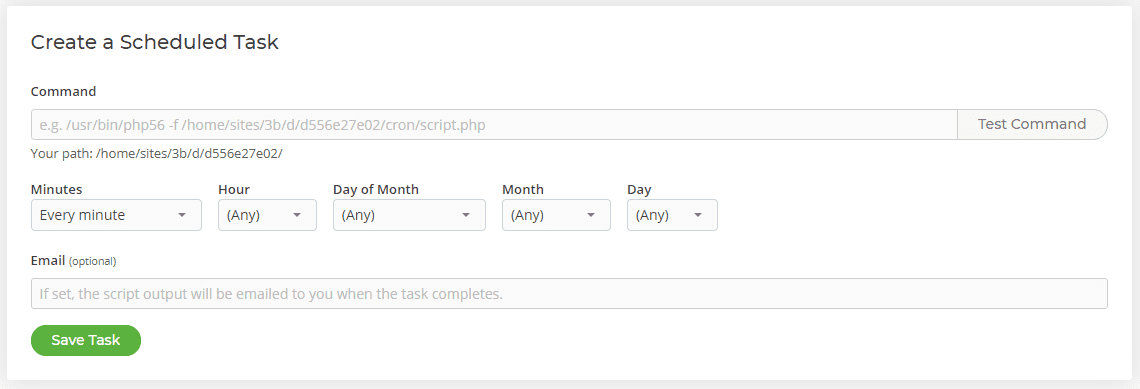
These are commands or jobs that are set to run regularly. They can be set to run at intervals of minutes, or the same time every hour, day or month.
On the Scheduled Tasks page there are three things to consider:
1. What command you are wanting to run?
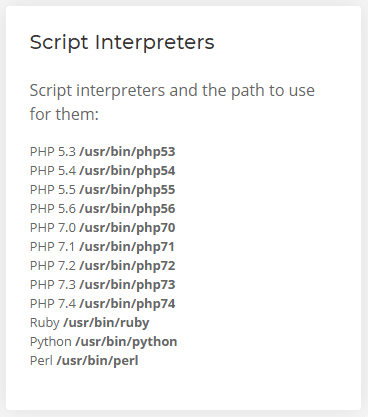
This is usually something like a WGET to a certain domain name or a PHP script. If you want to run a particular file such as WordPress's cron you'll need to use the correct version of PHP for the website. To select a particular version of PHP to run the command you use the commands to the right of the screen.
2. How often you need your cron to run?
This is selected from the drop-down boxes under where you enter the command. You can either use the first box to run it every 5, 10, 15 minutes or you can be more specific and select particular minutes in the hour, hours in the day or days in the month for the cron to run.
3. Would you would like to have emails sent to a specified address when a cron is run?
An email will only be sent if the cron produces an output so if the cron doesn't output anything no email will be sent.
